
Showing posts with label software. Show all posts


31 Comments
How to increase volume of a laptop/ PC more than its default
I tried pretty much everything such as increasing system volume and that enabling "loudness equalization" which actually decreased the volume. Anyway figured out that VLC media player gives more volume than the Windows Media Player.
All you have to do is get VLC Media Player from here. (http://www.videolan.org/vlc/)
You will notice that it shows the volume as 200% . But when you keep hitting ctrl + up arrow, it keeps increasing volume. Google search results say it increases the volume upto 400% but i dunno, i dont feel that much, anyway its way louder than the default volumeAll you have to do is get VLC Media Player from here. (http://www.videolan.org/vlc/)

Is your processor 32 bit or 64 bit?
Wondering is your computer processor 32bit or 64 bit? This is the easiest way to figure out.


Watch TV on your computer for free! with Readon TV Movie Radio Player 7.3.0.0
Readon TV Movie Radio Player 7.3.0.0
Readon TV Movie Radio Player is a revolutionary new software that allows you to watch thousands of TV channels and latest movies directly on your computer. You can also record your favorite radio and MTV songs to MP3 audio files.
License model ; Free
Limitations : Not available
Operating systems : Windows Vista, Windows 2000, Windows XP, Windows 7
Additional requirements : Microsoft .NET Framework 2.0, Windows Media Player 10
Here are some key features of "Readon TV Movie Radio Player":
1. Thousands of TV and radio channels from all around the world.
2. Watch latest movies (even those showing in the cinema now). 3. Live sports (NBA, european soccer).
4. A large variety of genres including movies, comedy, news, general TV, kids, music, pop, jazz, classic etc.
5. Record online music to MP3 audio files.
6. Record TV into asf fomat video files.
7. Adult videos search engine plugin(Thousands of videoss).
8. Flash games search engine plugin(Thousands of games).
9. Music on demand search engine plugin (Millions of MP3)
10. Movie search engine plugin.
11. User password protected to disable viewing of adult content.
12. Includes all SopCast and ShoutCast Channels.
13. Google Youtube
14. Free to use.
15. Auto updatable channel lists.


Readon TV Movie Radio Player is a revolutionary new software that allows you to watch thousands of TV channels and latest movies directly on your computer. You can also record your favorite radio and MTV songs to MP3 audio files.
License model ; Free
Limitations : Not available
Operating systems : Windows Vista, Windows 2000, Windows XP, Windows 7
Additional requirements : Microsoft .NET Framework 2.0, Windows Media Player 10
Here are some key features of "Readon TV Movie Radio Player":
1. Thousands of TV and radio channels from all around the world.
2. Watch latest movies (even those showing in the cinema now). 3. Live sports (NBA, european soccer).
4. A large variety of genres including movies, comedy, news, general TV, kids, music, pop, jazz, classic etc.
5. Record online music to MP3 audio files.
6. Record TV into asf fomat video files.
7. Adult videos search engine plugin(Thousands of videoss).
8. Flash games search engine plugin(Thousands of games).
9. Music on demand search engine plugin (Millions of MP3)
10. Movie search engine plugin.
11. User password protected to disable viewing of adult content.
12. Includes all SopCast and ShoutCast Channels.
13. Google Youtube
14. Free to use.
15. Auto updatable channel lists.
How to make your computer talk
You can make your computer talk. You'll need to create a visual basic script file that will pop up a message for you to write something. When you write on it and press OK - your computer will speak it. So, go ahead give your PC a voice...
1) Open Notepad
2) Copy the below text and paste on notepad...
Dim userInput
userInput = InputBox("Write a message for me to say")
Set Sapi = Wscript.CreateObject("SAPI.SpVoice")
Sapi.speak userInput
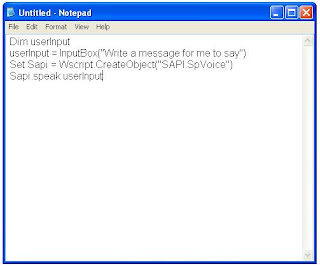
3) Be Sure To Save As .VBS

4) Now open it and you will see an place to write
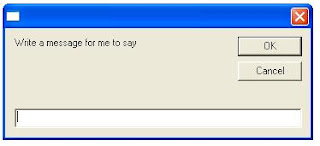
5) When you write it and press OK
6) Your computer will tell what you typed
1) Open Notepad
2) Copy the below text and paste on notepad...
Dim userInput
userInput = InputBox("Write a message for me to say")
Set Sapi = Wscript.CreateObject("SAPI.SpVoice")
Sapi.speak userInput
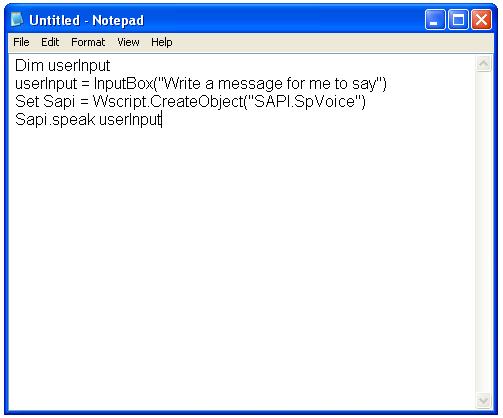
3) Be Sure To Save As .VBS

4) Now open it and you will see an place to write

5) When you write it and press OK
6) Your computer will tell what you typed
How to make conference calls in Skype
If you want to have a conversation with few of your friends at the same time, the best way is to use group chat on MSN. But you can’t use voice or video with a group in MSN. Only text chat is available.
Well here is the solution. (But sorry no. You can’t have conference calls in MSN/Windows Live Messenger) Use Skype.
I know there are tons of other applications that provide the same facility, I just picked this because everyone knows this. You should try using other applications too. (Its not hard to find them. Just look around sites)
In my opinion Skype isn’t good for text chatting. You can’t have customized fonts, emoticons and stuff in it. But it is the best way to have a video call or voice call. And you can have voice chat conversations (call conference). Just follow these steps.
If you don’t have Skype installed, you can get the latest version from here. (It’s free)
Download Skype (click that green button)
If you are using another operating system, pick one from the right side panel in that site.
After you have signed up and log in, add your contacts.
Then follow these steps. (Right click and open in new tab to see enlarged view)Step - 1 ........................................ Step - 2


Step - 3

How to put a video as the wallpaper background
 Dreamscene Video Wallpaper launches a compact, simple-but-functional interface that's very easy to comprehend and navigate. There are no tabs or other dialog boxes to access. All its features are accessible from the one small window, which is a plus for this otherwise uninspired design.
It's very easy to set up and use. Selecting existing video files from your hard drive and organizing categories to rotate the playlist style was simply a matter of a few clicks and keystrokes.
But the "dont forget to register button is annoying. It wont be hard to find a key on Google anyway :D

Bored and nothing to do? get trolled by a software
 Well the title says it all. It's just a stupid software saying stuff to you online.
try this. you might like it
It is a chatterbot created by Fred Roberts, using Artificial Solutions’ technology and it has been online since 2001.
See whats happening when you are not around.
Easy-to-use software brings professional-grade video monitoring to anyone with a webcam or network camera. Know exactly what you’ve missed without scanning hours of video.